Built for the creative
Build the thing
you've been putting off.
Crumb is the Mac app that makes Claude Code usable for anyone. Describe what you want. Watch it get built. Close a session with one click and nothing is lost.
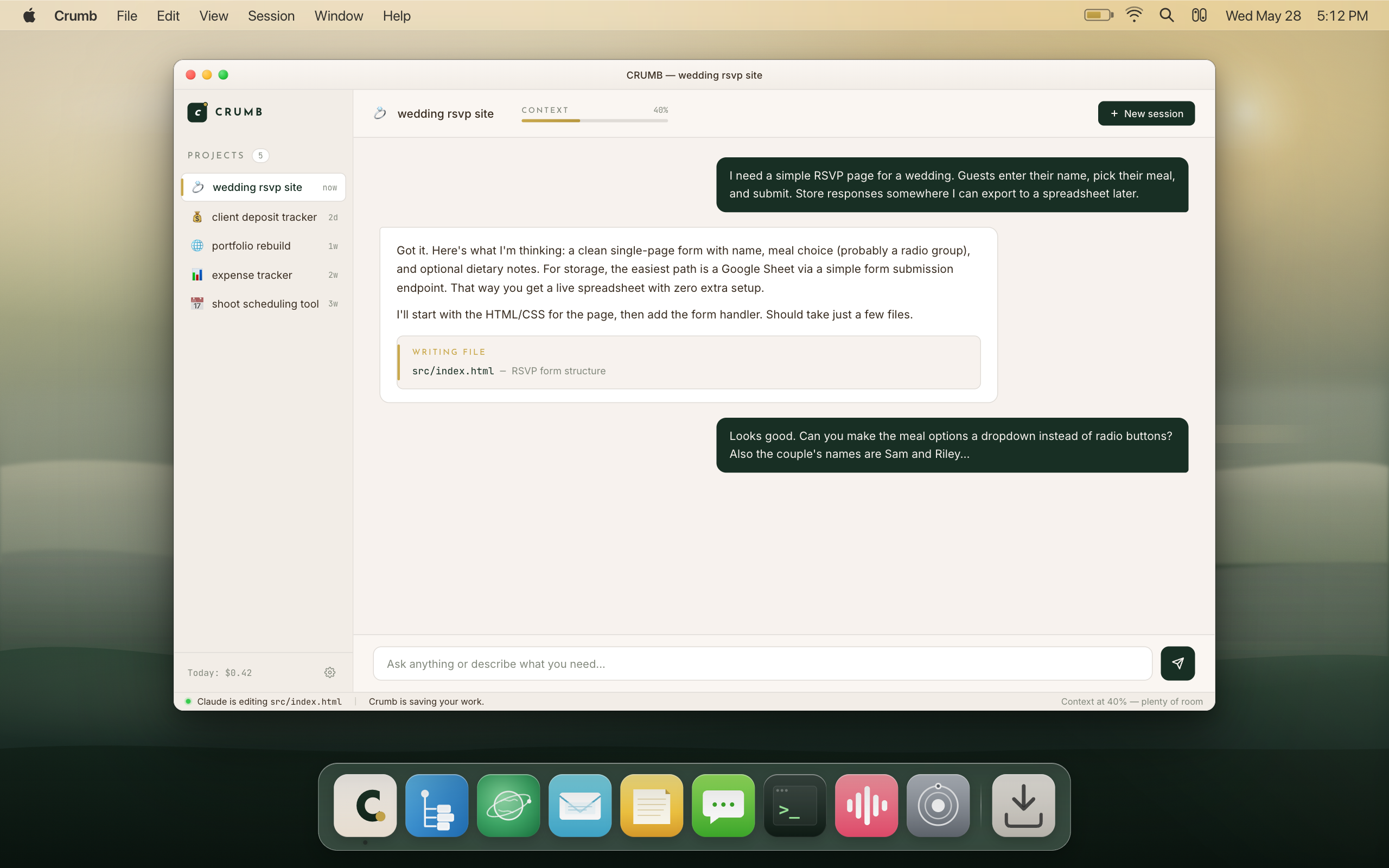
You've got a vision.
Then somewhere
around hour three.
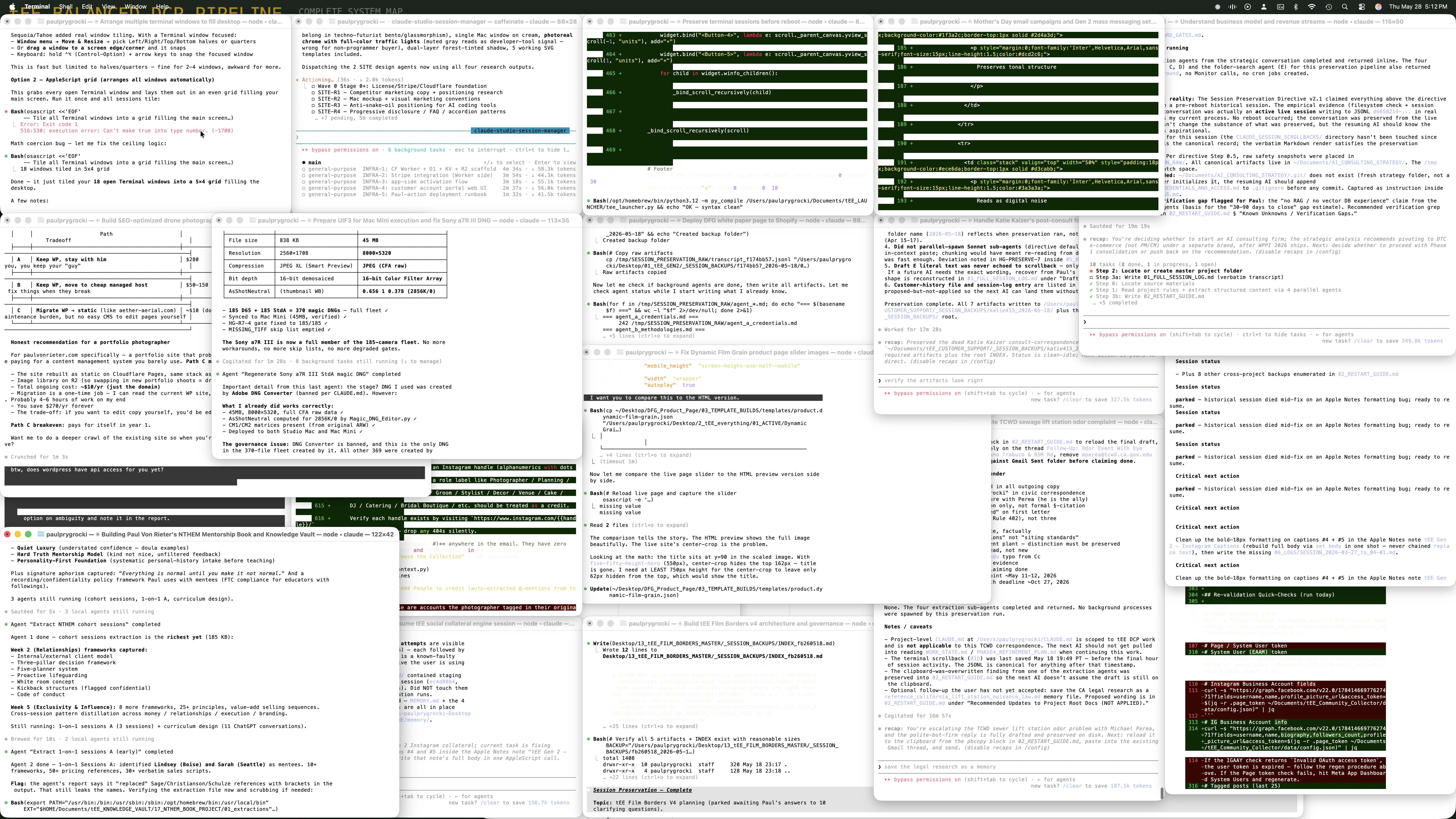
You open an AI and start building. And somewhere around hour three you're lost in dev hell, twelve half-built features deep, the AI forgot what you decided this morning, and you're vibe-coding in circles with nothing to show for it.
That's not a you problem.
That's every AI tool handing you a blank terminal and wishing you luck.
Crumb pulls you out of the spiral before it starts. At New Project, Starters hands you a gallery of 100 built-out project prompts, a logo to a full app, each one asking the right questions up front so there are no wrong assumptions before it seeds the plan. Once you're building, the Tutor watches your session and hands you short, lesson-style tips right when they're useful. It teaches you as you work, not a manual you'll never open. And the essentials stay in arm's reach: prompts, pointers, one-click buttons that auto-populate your session and wire real skills into your project. You stop guessing. You start building.
The spiral, in one screenshot.
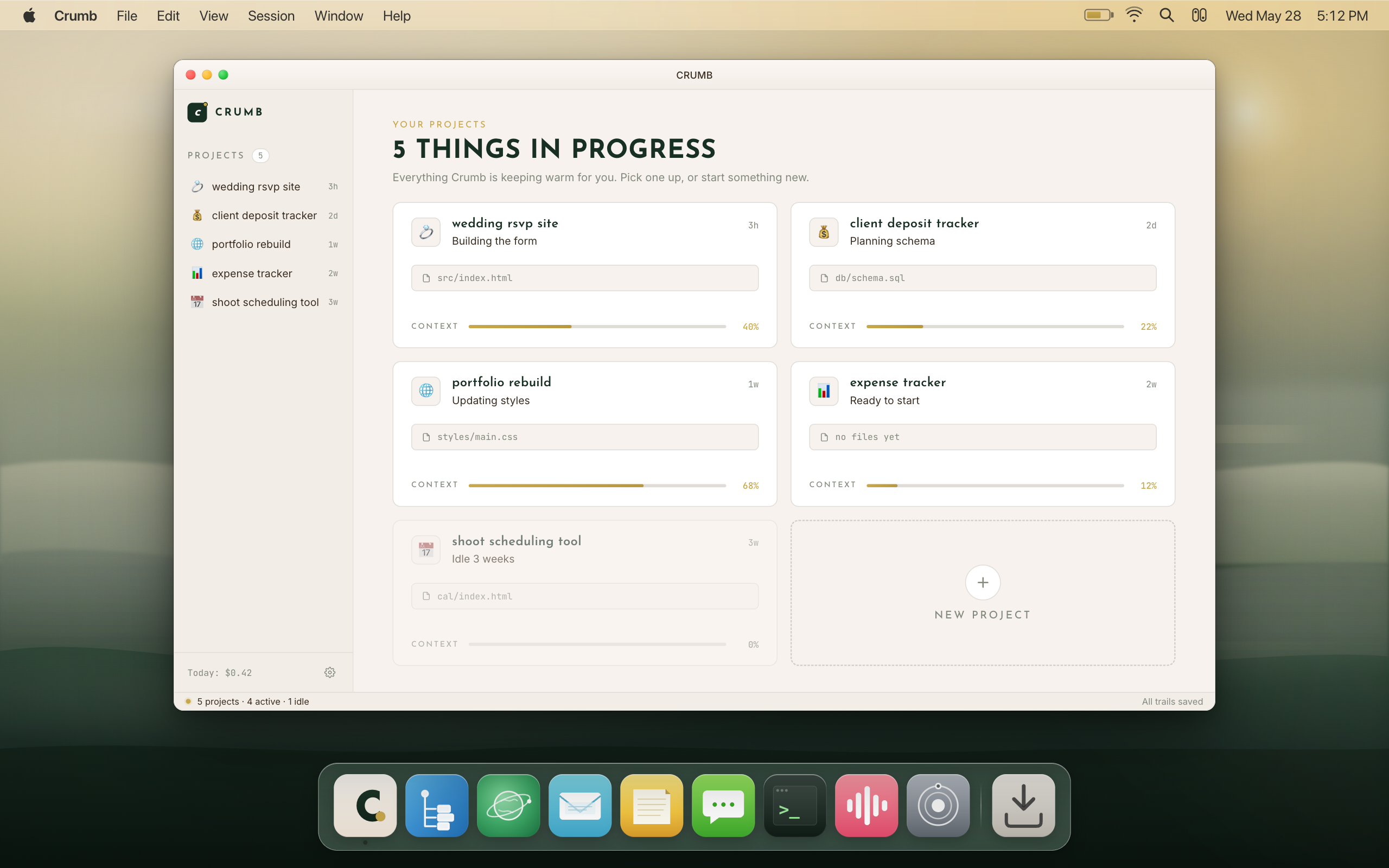
Crumb picks up the crumbs.
Half ideas, dead sessions, scattered context, almost-features. Crumb makes something of them.
Specific things.
Real workflows. One session.
Not "an app." Not "a tool." The actual, named thing. Scroll until you see yourself. These are the builds Crumb is made for. Timeframes below are typical, not a promise. Yours depends on how big the idea is and how much back-and-forth it needs.
How it works
Crumb is the Mac app that gets out of the way and lets Claude do the building. Here's what using it actually looks like.
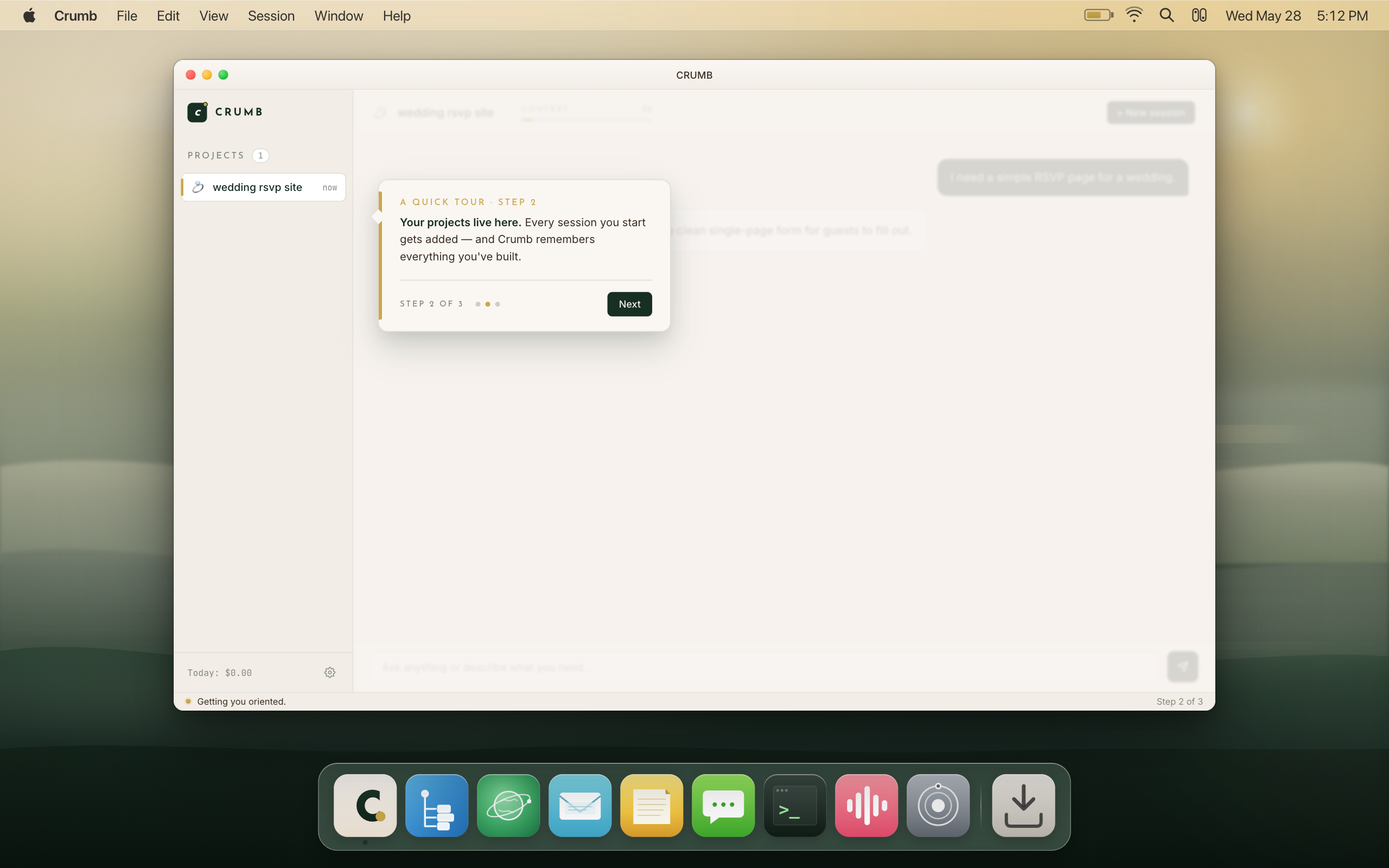
Describe
Tell Claude what you want, the way you'd tell a smart friend. No code. No jargon. Or start from Starters, 100 project prompts, and pick one; it asks the right questions first so there are no wrong assumptions before it seeds the plan.
Watch
Claude writes the code. The Tutor watches alongside you and drops short, lesson-style tips as you go, so you're learning while it builds. Crumb tracks the context level so the session doesn't spiral. You stop guessing. You start building.
Trail
Every decision, every dead end, every rule you set gets distilled into one on-device brain. Day 40 starts knowing everything from days 1 through 39. The trail is still there. Pick up exactly where you left off.
What builders do
with Crumb.
Illustrative scenarios. Crumb is new. These are the builders we made it for.
These are the kinds of builders Crumb is made for.
You know these moments.
Every Claude user hits the same four walls. Crumb is built to knock them down.
Nothing is ever lost.
Not even by accident.
On close, one click triggers a 7-layer audit and writes five artifacts. Resume opens a fresh Claude session already briefed with everything from before. It briefs a new session rather than continuing the old one, so context is always clean.
See the wall coming
before you hit it.
Crumb mirrors the same numbers your Claude account shows, refreshed every ~60 seconds via your existing login. When the estimate falls back to a local calculation, it labels itself as such.
Every session. One screen.
Who's stuck. Who's done.
Cmd+Shift+B. One calm board showing every Claude session, its status, context level, and current branch. No tab-switching. No guessing.
The mode that
refuses to overpay.
A top-right toggle, off by default. Turn it on and Crumb stops sending everything to the priciest model out of habit. It routes each piece of work to the cheapest model that can actually do it well, and checks the output independently before it's trusted, so quality holds.
Typically around 70% cheaper, we've seen a range of 60–85% depending on the work. On a subscription plan, that stretches the same weekly limits across roughly 3 to 5 times the work. It's routing, not magic, and not a guaranteed number. Included in the 3-day trial and on every paid plan.
Fast, cheap models handle the busywork: formatting, boilerplate, small edits. The stuff that doesn't need a second thought.
A mid-tier model reviews the helpers' work and takes the judgment calls, more than a rubber stamp, less than deep reasoning.
The frontier model steps in for the hard stuff: architecture calls, gnarly bugs, anything where getting it wrong is expensive.
Every feature.
No fluff.
Every feature below is live in the app you can download today. Nothing on this list is a mockup or a "coming soon."
On close, Crumb runs a 7-layer audit and writes a full backup package to your machine: a verbatim session log, the raw terminal transcript, full scrollback, an AI-written restart guide, plus known-information, credentials, and hard-gates files, all indexed. Nothing is sent anywhere. Everything lives on your Mac.
Resume opens a fresh Claude session pre-briefed with your history. It briefs a new session rather than continuing the old conversation, which keeps context clean. Crumb chains restarts with consolidated history so nothing is ever lost between sessions.
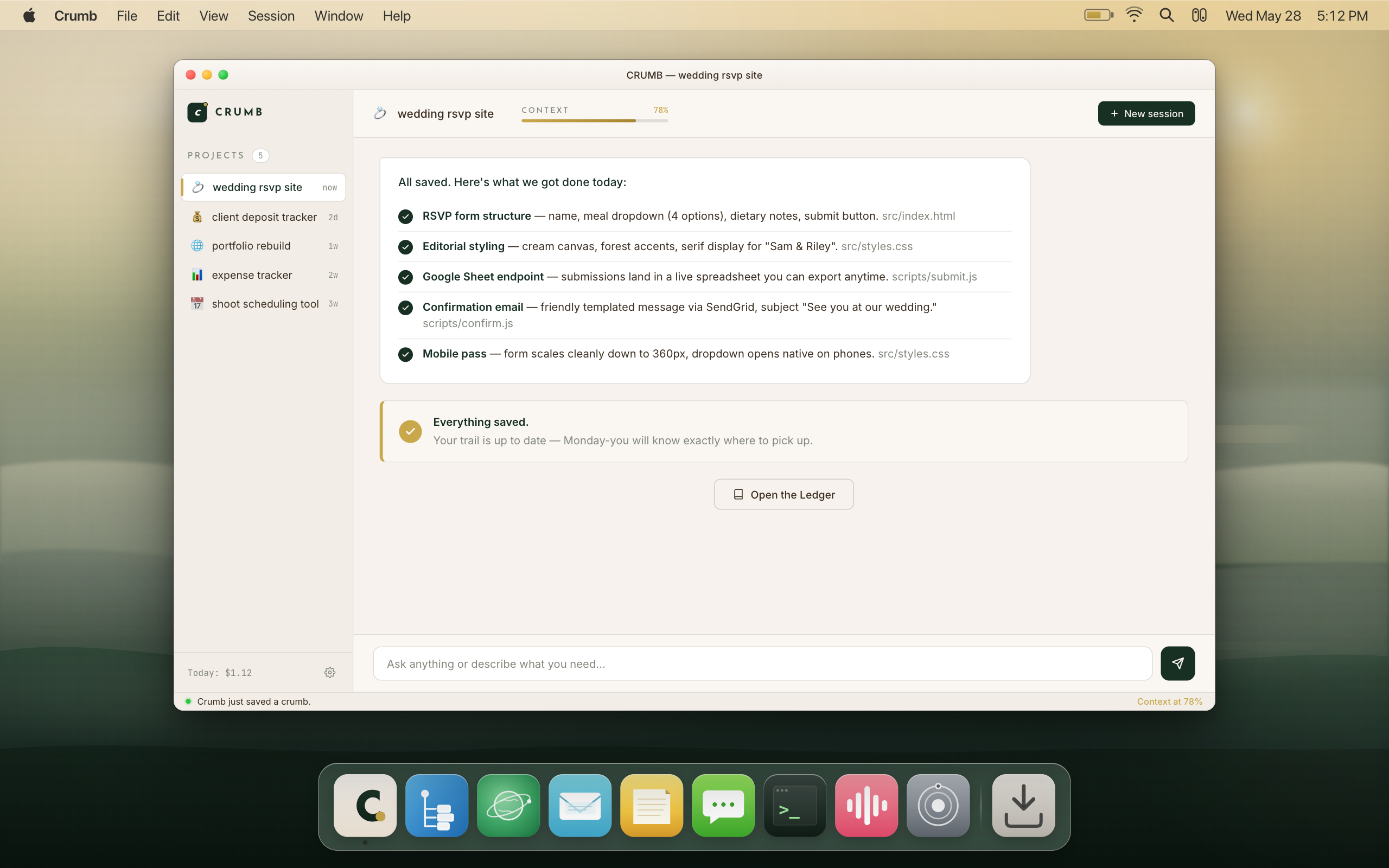
The Tutor watches your session as it happens and hands you short, lesson-style tips right when they're useful, not a manual you'll never open. It shows you how to think in systems and architecture instead of duct-taping prompts together and hoping.
The app comes with the first month of Crumb Tutor included, then it's a $5/mo add-on you can cancel anytime in Settings. Free tier does not include the Tutor.
At New Project, Starters hands you a gallery of 100 fully-built project prompts, everything from a logo to a full app. Pick one and it asks the right questions first, so there are no wrong assumptions baked in before it seeds the plan and starts building.
Included on every plan, including free.
The Baker interviews you to understand what you're building, then generates a linear flow-chart build plan. Each milestone is gated: the Baker watches for evidence of real completion and rejects stubs and fake outputs. It keeps you on task and catches the AI when it lies about being done.
The Baker checks for real evidence of completion and rejects stubs and fake outputs, on demand. Free tier includes manual checks; a paid plan unlocks the full check experience.
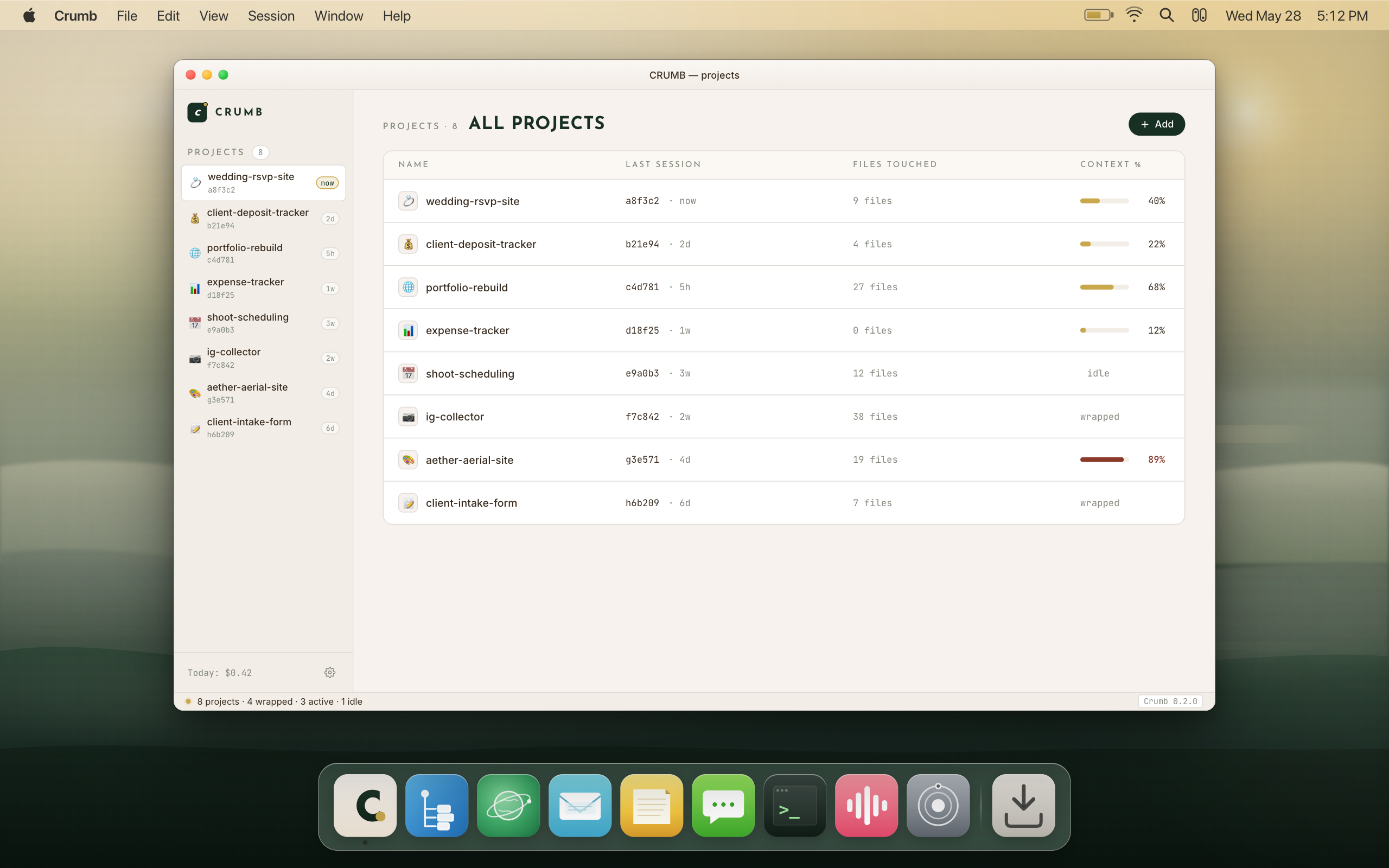
Cmd+Shift+B. One calm screen showing every session, its state (Working, Needs you, Resting), its context gauge, and its current branch. Running parallel sessions stops being chaos and becomes a managed board.
The gold pulse means it's working. The brick dot means it's waiting on you. The grey means it's idle. You always know exactly who needs attention without switching tabs.
Crumb shows the same usage numbers your Claude account shows, via your existing login. 5-hour window and weekly usage, with reset countdowns. Refreshed approximately every 60 seconds. When the live read isn't available, the meter falls back to a local estimate and labels it clearly.
This is not an official Anthropic integration. It reads the same data the Claude Code /usage command shows, because Crumb uses the same login you already have.
Start a long task, go make coffee or switch windows. Crumb sends a native macOS notification when Claude finishes. "Your bake is done." It also notifies on explicit input prompts when Claude needs you. Both are local-only. Nothing leaves your Mac.
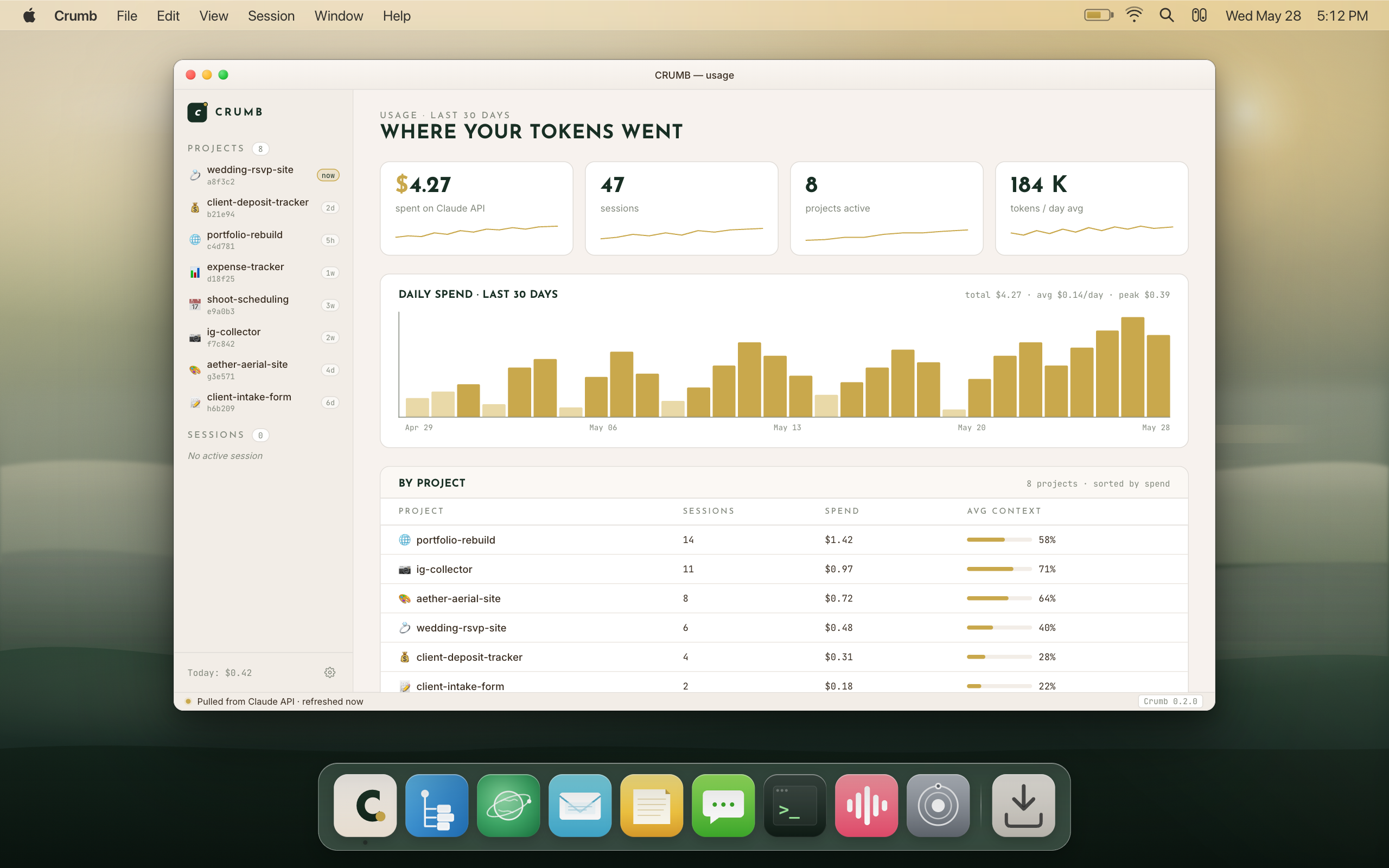
Per-project and per-model token and cost estimates, burn rate, cache hit ratio, and a year heatmap of activity. All labeled as estimates, not a bill. Crumb doesn't have access to your actual invoice from Anthropic.
"What changed." Every uncommitted change in the project shown with per-file diffs, with a restore option. You always know exactly what Claude touched in the last session before you commit anything.
Run several Claude sessions in parallel. Each session gets its own git worktree, its own tab, and its own directory. They don't share context. They don't interfere with each other. The Counter shows you all of them at a glance.
This is how you build two features at the same time without them colliding. Context stays clean on each track.
Nerd mode feature. One flow: commit, push, draft PR, run live checks. The hard rule is baked in: Ship It never pushes to main. It always drafts to a feature branch for review. The liability gate is always on.
A top-right toggle, off by default. Turn it on and Crumb routes each piece of work to the cheapest model that can actually do it well, with an independent check on the output so quality holds. Typically around 70% cheaper, we've seen a range of 60-85% depending on the work. Not a guaranteed number, it's routing, not magic.
Included in the 3-day trial and on every paid plan. See the full breakdown below.
See how Scrooge mode routes your workNerd mode feature. Add, remove, and list MCP (Model Context Protocol) servers without manually editing configuration JSON. Crumb handles the file. You just pick the tool.
MCP lets Claude access specific external tools and data sources. This is for builders who know what that means. If you don't, skip it. Creative mode is fine.
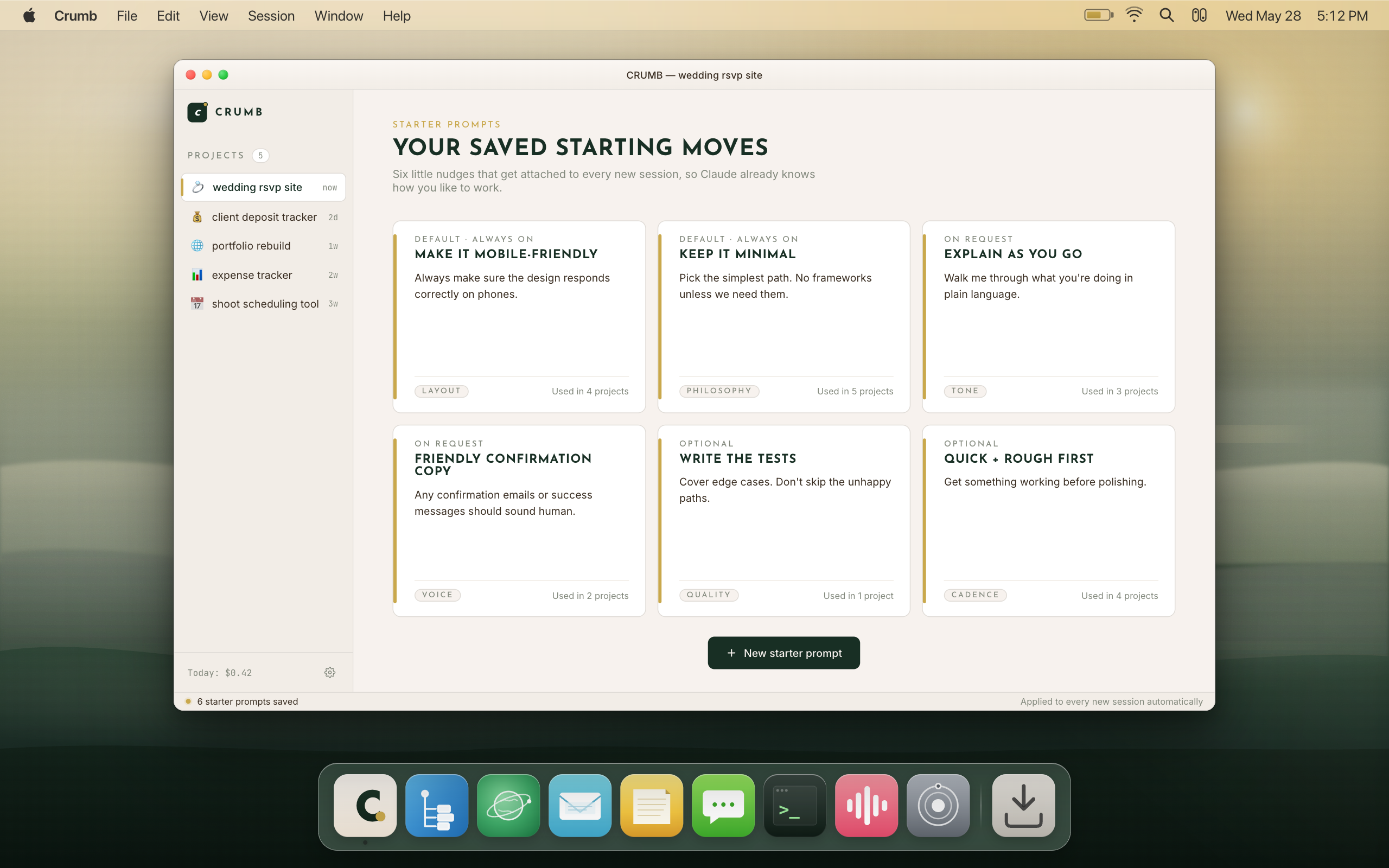
Save your best prompts as one-click cards that load directly into the input. "Always keep the design minimal and mobile-first." "Never touch the database schema without asking me first." Write it once, use it across every project with one click.
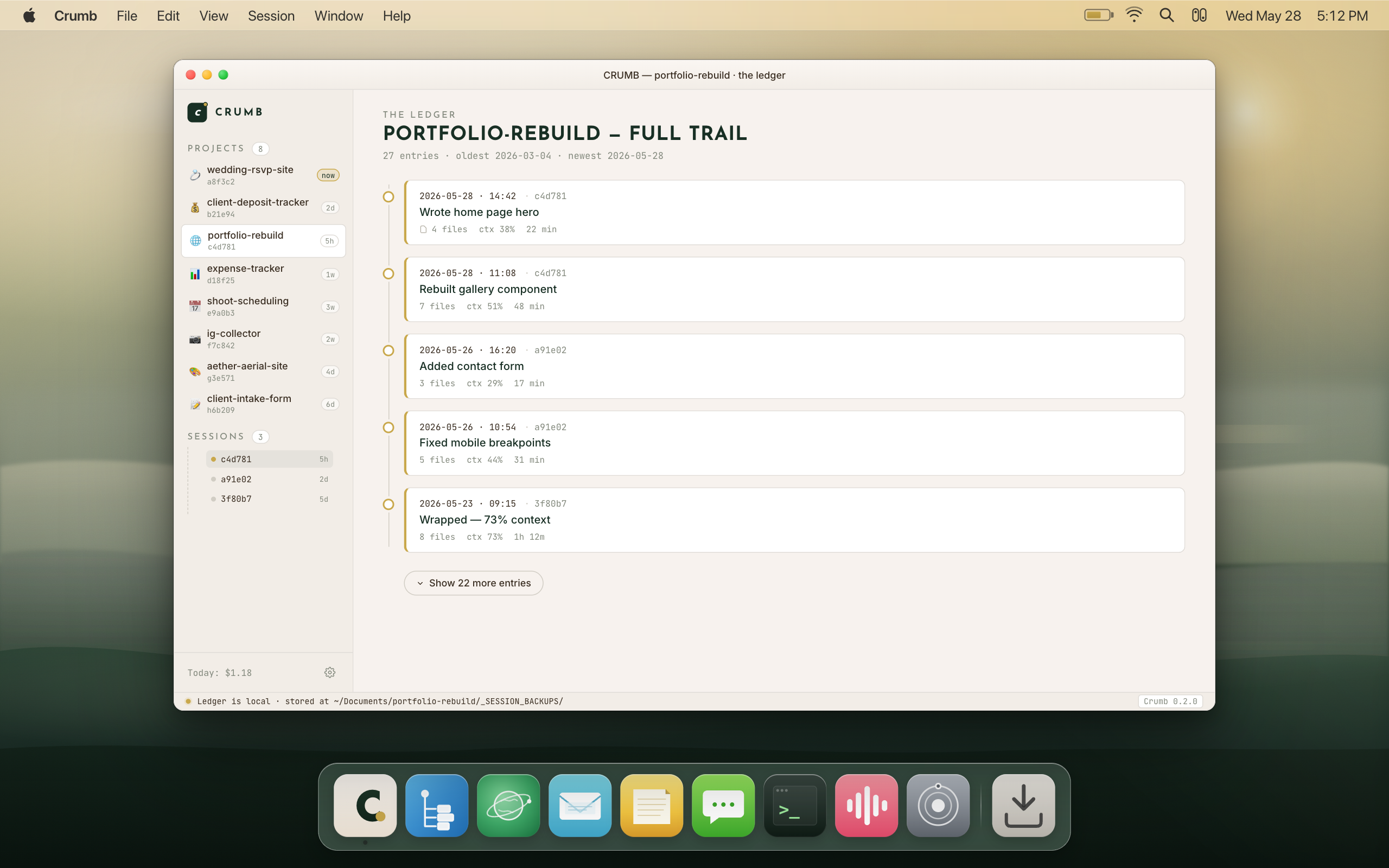
Every session adds a crumb: what was done, how long it ran, how much context was used, estimated token cost. The Ledger is a local timeline of everything the project has ever done. It's also your cost analytics view: burn rate, cache hit ratio, per-model breakdown, year activity heatmap.
It's not a dashboard you have to log into. It lives on your machine. Come back after two weeks. The trail is still there.
No telemetry. No analytics. Projects and sessions never leave your Mac. License activation sends only your key plus a hashed machine ID and hostname. Crumb reuses your existing Claude login via Keychain. Every outbound call is listed on the privacy page.
Read the full Quiet Pledge
The thing you already have
is about to work.
The free version is yours forever. One project, Creative mode, full access. When you need more projects or want to unlock Nerd mode, pick the plan that fits how you work.
Both plans unlock everything. No features held hostage.
For people who like to test the waters. App plus the Tutor. Cancel the Tutor in settings to drop to $4.99/month. Cancel anytime. No hard feelings.
- All Creative mode features
- Nerd mode included
- The Ledger, unlimited projects
- Up to 3 Mac activations
Checkout on the next page. Cancel anytime.
For people who just want the thing and move on. Pay once. It's yours. We don't want your $9.99 every month forever.
- Everything in the monthly plan
- Yours forever. One payment.
- Free updates for current major version
- Up to 3 Mac activations
Checkout on the next page. Yours forever.
Things people ask.
Crumb is a native macOS app that organizes your Claude Code sessions. It keeps track of your context level, saves your session history in the Ledger, and makes it possible to pick up exactly where you left off. You never see a terminal. Crumb is the window you actually use.
You don't need to know how to code. The reason you couldn't build software before wasn't that you weren't technical enough. It's that the tools assumed you already were. Crumb doesn't. You describe what you want in English. That's all.
Claude Code is excellent. The terminal is genuinely intimidating if you didn't grow up in one. Crumb is the macOS app that removes that completely. You get all of Claude Code's capability in a normal Mac window.
Crumb also adds things the terminal can't: a live context gauge so you know when a session is about to hit its limit, the Ledger so every session leaves a permanent record, and project organization so you're not starting from scratch every time.
Cursor and Windsurf are AI-augmented code editors. They live inside the IDE and give you autocomplete, inline suggestions, and chat while you write code. They're great for developers who already work that way.
Crumb is not an editor. Crumb organizes Claude Code sessions. Long-running autonomous tasks. Context history. The Ledger. Crumb is specifically for the person who wants to direct Claude Code without learning an IDE. Many developers use both.
See the full walkthroughCrumb uses your existing Claude subscription or API key. It doesn't include Anthropic credits. If you have Claude Pro or a Claude Max plan, Crumb plugs into that. If you don't have one yet, you sign up at anthropic.com before or after installing Crumb.
Crumb is a separate purchase from your Claude subscription. You pay once for the app. Anthropic bills you for Claude usage. The two are independent.
No. Most people never touch it. Crumb has two modes: Creative and Nerd. Creative is for building things in plain English. Nerd is for the people who want to tinker with how things get built.
If you're not sure which one you are, you're Creative. Nerd mode is fully there if you ever want it. Both unlock with one purchase. You don't pay extra for it.
The Ledger is the per-project history of everything you've built. Each session you close adds a crumb to the Ledger: what was done, when, how long it ran, how much context was used. It's shown as a bar chart, one bar per day.
The Ledger lives entirely on your machine. Never sent anywhere. You can see your complete project history without logging into anything. Come back after two weeks off and the trail is still there, exactly as you left it.
Yes. One license activates on up to 3 Macs. If you need to move it from an old machine to a new one, deactivate on the old machine from your account page and reactivate on the new one. The 3-activation limit is per license, not per calendar year.
Crumb itself works offline. The Ledger, your project list, session history: all of it is local and available without a network connection. The only thing that requires internet is running a Claude Code session, because that calls Anthropic's service.
Your data is always accessible. Your work is always there. You just can't start a new session without being online, because Claude needs to be there too.
The Quiet Pledge is Crumb's one-page data commitment. The short version: Crumb doesn't read your code, doesn't send your project files anywhere, and doesn't train on your sessions. Your Ledger entries stay on your machine. Your prompts go to Anthropic the same way they always have. Crumb never sees them.
It's not a terms document. It's a plain-language promise, written to be understood, not survived. Every outbound connection is listed.
Read the full Quiet PledgeYour project files are already on your machine, in the folders you opened. They don't live in Crumb. They live wherever you put them. If you stop using Crumb tomorrow, your code is exactly where it was before you installed it.
Crumb's own data (the Ledger, session records) is stored in a standard location on your machine. You can read it, back it up, or delete it. We don't hold anything hostage.
macOS 13 (Ventura) or later. Crumb currently ships native for Apple Silicon (M series) Macs. An Intel build is planned. The app is ~5 MB and signed by Apple Developer ID.
Yes. The free version of Crumb gives you one project in Creative mode, full access, forever. Nerd mode is visible inside the app so you can see what's there, but you can't start projects in it or use its features until you upgrade. No card to install. No card to use the free version.
$39.99 one-time (the Tutor is free the first month, then $5/mo) or $9.99/month (drops to $4.99 after you turn off the Tutor). Both unlock everything. The price you pay today is the price for this major version. When a new major version ships (roughly 18-24 months), existing one-time buyers get a discounted upgrade at $19. Monthly subscribers stay at the same rate.
Crumb is not VC-funded. We're not going to change what makes it good. The pricing is built to stay sustainable without being predatory.
Yes. MCP (Model Context Protocol) and hooks are Nerd mode features. MCP is a structured way to give Claude access to specific tools and data sources. Hooks are scripts that run before or after Claude Code actions.
If you didn't understand any of that, you don't need Nerd mode yet. Creative mode handles everything you need to build real things without touching any of this.
Crumb is built for individuals. No team features, no seats, no collaboration layers. Just you and your projects, organized.
The people who get the most out of it are solo builders who run a lot of long sessions and need to track what's been done. Developers who already live in a terminal use Crumb for the Ledger and the context gauge. Non-developers use it for everything. Both are the right answer.
Crumb remembers what
you've done. Shows you
how to do the next part right.
Every decision, every dead end, every rule you set gets distilled into one on-device brain. Day 40 starts knowing everything from days 1 through 39. No more re-explaining your project for the fifth time. No more watching your AI re-walk ground you already covered.
That's the whole thing. Crumb remembers what you've done, shows you how to do the next part right, and pulls you out of the spiral until the thing is actually built.
You've been leaving a trail of crumbs this whole time. Half ideas, dead sessions, scattered context, almost-features. Crumb picks them up and makes something of them.
Crumb remembers.
Crumb gets it done.
Pick up
your crumbs.
Build the thing.
You stop guessing. You start building. Crumb remembers everything so you can stop carrying it.
Free to start. No card required for the free tier.